Core Rules
To access and configure Core Rules, perform the following tasks:
- Ensure that you are logged into your Blackwall account.
- From the main navigation menu bar, select Websites.
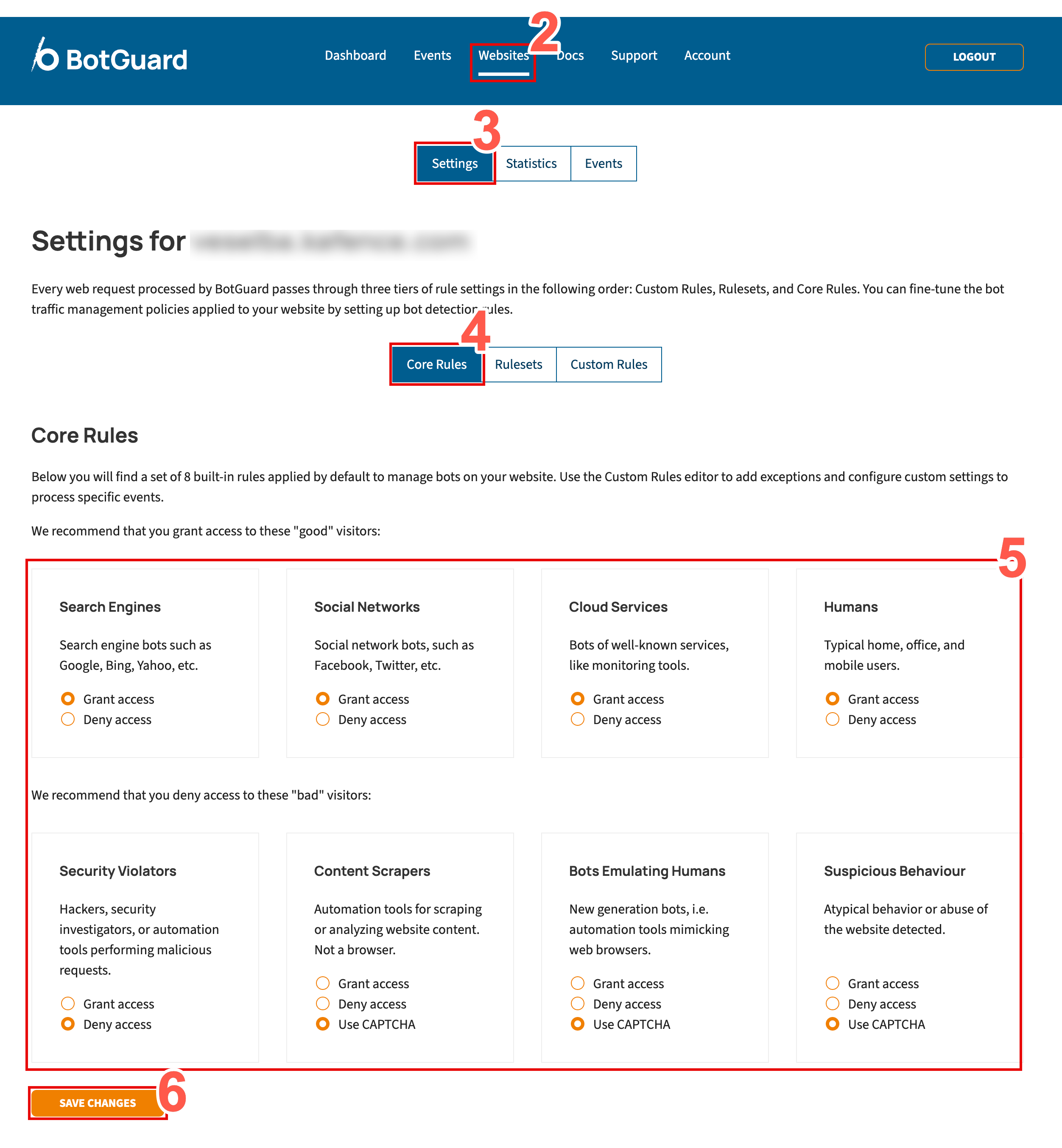
- In the secondary menu, select Settings.
- From the rules menu, select Core Rules.
-
From the eight core rules displayed, locate the rule that you wish to modify.
Description of Blackwall core rules
We recommend that you grant access to the first four:
-
Search Engines - Search engine crawlers such as Google, Bing, Yahoo, and other indexing services that scan websites to discover and rank content in search results. These bots are generally considered trusted traffic and are important for SEO visibility, search discoverability, and content indexing. Administrators can choose to allow or deny access depending on business or security requirements.
-
Social Networks - Bots and crawlers operated by social media platforms such as Facebook, X (Twitter), LinkedIn, and others. These services typically access websites to generate link previews, retrieve metadata, or analyse shared content. Allowing these visitors helps ensure correct rendering of shared links and social media integrations.
-
Cloud Services - Automated traffic originating from recognised cloud-based services, infrastructure providers, or monitoring platforms. This category may include uptime monitoring tools, performance scanners, analytics platforms, and other legitimate cloud-hosted services. Depending on your environment, these services may be required for monitoring, integrations, or operational visibility.
-
Humans - Typical human visitors accessing the website through desktop browsers, mobile devices, or office networks. This category represents normal end-user traffic and is generally expected to have unrestricted access to website resources. Additional protections, such as content encryption, can be applied to secure content delivery and reduce automated analysis of sensitive page content.
We recommend that you deny access to the last four:
-
Security Violators - Visitors identified as potentially malicious or associated with abusive, hostile, or suspicious activity. This may include hackers, vulnerability scanners, exploit frameworks, credential-stuffing tools, or automated systems attempting to probe or attack the website. Blocking these visitors helps reduce security risks, prevent reconnaissance activity, and protect application resources from abuse.
-
Content Scrapers - Automation tools designed to collect, copy, analyse, or archive website content at scale. These visitors are commonly associated with data scraping, competitive intelligence gathering, AI dataset collection, or automated content harvesting. Depending on business requirements, administrators may choose to block these visitors, challenge them with CAPTCHA, or apply content encryption to help protect sensitive or proprietary content.
-
Bots Emulating Humans - Advanced automation frameworks and next-generation bots that attempt to mimic legitimate browser behaviour in order to bypass traditional bot detection mechanisms. These visitors may simulate mouse movement, browser execution, session handling, or other human-like interactions. Because these bots are often associated with credential abuse, scraping, or automated attacks, they typically require stricter mitigation measures such as CAPTCHA enforcement, encryption, or access denial.
-
Suspicious Behaviour - Visitors exhibiting unusual, abnormal, or potentially abusive behaviour patterns detected by Blackwall’s analysis engine. This category may include excessive request rates, behavioural anomalies, suspicious navigation patterns, or activity commonly associated with automated abuse or account compromise attempts. Administrators can apply additional protections such as CAPTCHA challenges, encryption, or outright blocking to reduce the risk posed by suspicious traffic.
-
-
For the rule that you choose to modify, select a radio button that corresponds to your desired behaviour. The radio buttons possible are:
- Grant access
- Encrypt Content - This checkbox only becomes available if you select Grant access. Optionally, if you place a check in the Encrypt Content checkbox, the traffic that you are granting access to is carried over an encrypted path, rather than the default transport. It doesn’t change what gets through; it only changes how the allowed traffic is transported. Enable Encrypt Content to provide enhanced security via encryption, keeping allowed traffic private in transit and enhancing latency.
- Deny access
- Use CAPTCHA (only available on some rules)
- Grant access
- Click Save Changes to save your changes.
Default Core Rule settings
Blackwall recommends keeping Blackwall's default Core Rule settings, unless you have a particular use case that necessitates a change.